
Habit tracker template for Google Sheets and Excel
Type your habits, pick the year and download a ready-made spreadsheet: one sheet per month, a yearly summary, and totals, completion rates and streaks that calculate themselves. Free, for Google Sheets, Excel and Numbers.
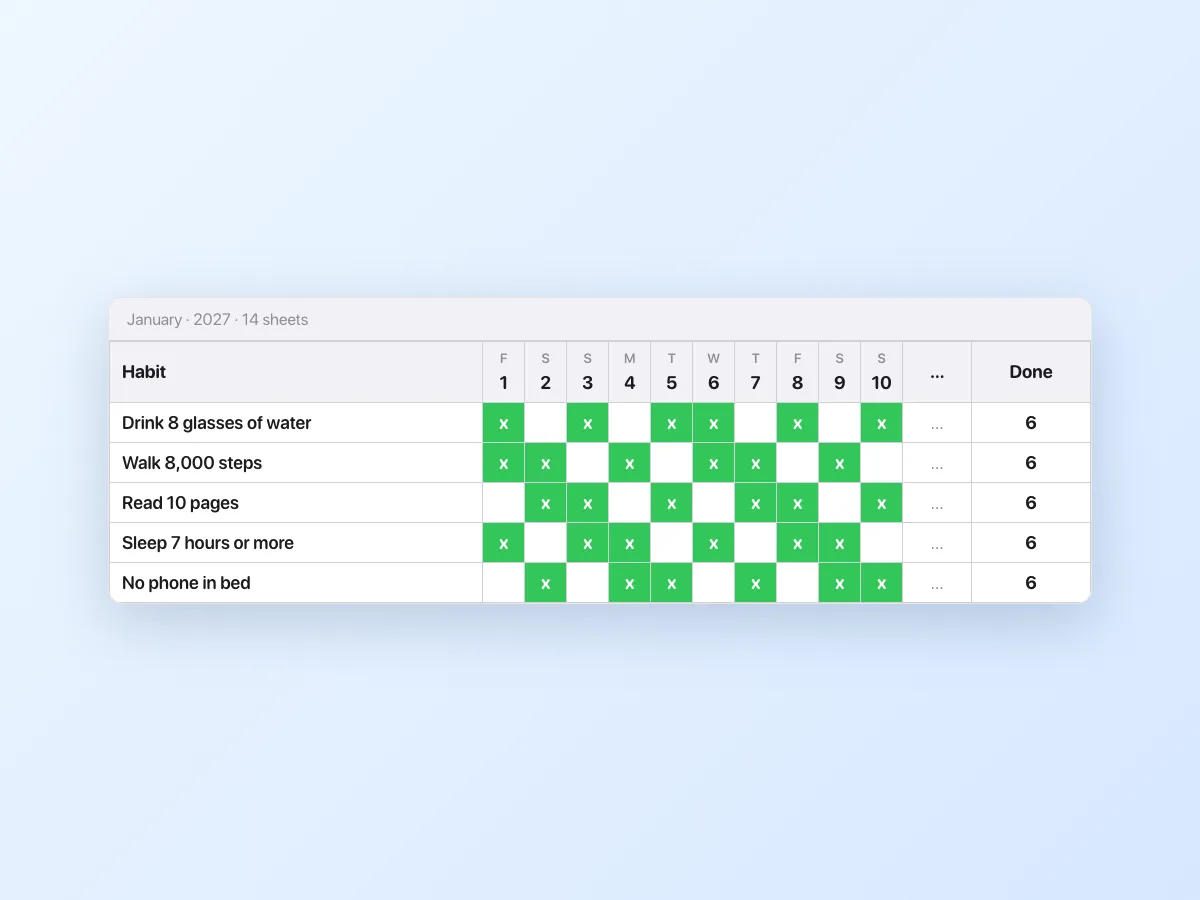
| Habit | F1 | S2 | S3 | M4 | T5 | W6 | T7 | F8 | S9 | S10 | … | Done |
|---|---|---|---|---|---|---|---|---|---|---|---|---|
| Drink 8 glasses of water | x | x | x | x | x | x | … | 6 | ||||
| Walk 8,000 steps | x | x | x | x | x | x | … | 6 | ||||
| Read 10 pages | x | x | x | x | x | x | … | 6 | ||||
| Sleep 7 hours or more | x | x | x | x | x | x | … | 6 | ||||
| No phone in bed | x | x | x | x | x | x | … | 6 |
Opens in Excel and Numbers. For Google Sheets: File, then Import, then Upload.
What is in the spreadsheet
The file has 14 sheets: a summary of the year, one sheet per month, and a Streaks sheet that counts the days in a row. Each month lists your habits in rows and the days in columns, with weekends shaded. Type x in a cell when you did the habit: the cell takes your color, and the Done column, the completion rate and the daily score at the bottom update on their own. The summary adds up every month and shows your current and best streak for each habit.
How to open it in Google Sheets
Download the file, then in Google Sheets choose File, then Import, then Upload, and select it. Choose Replace spreadsheet or Insert new sheets. The formulas and colors come with it. In Excel or Numbers, simply open the file.
Checkboxes instead of x
In Google Sheets, select the days of a month, then choose Insert and Checkbox. A checked box counts as done and an empty one does not, so the totals and the streaks stay right. In Excel, recent versions have the same checkboxes in the Insert tab.
How streaks are counted
A streak is the number of days in a row you checked a habit. It goes on from one month to the next, and a day you have not filled in yet does not break it: the summary keeps yesterday's streak until tonight. The Streaks sheet does the counting, so leave it as it is.
Spreadsheet or app?
A spreadsheet is great if you live at your computer and like to see raw numbers. It is less handy on your phone, and it never reminds you. If you prefer paper, the printable habit tracker makes monthly, weekly or challenge sheets. If you want reminders, widgets and Apple Watch, an app like Habits does the counting for you, with a free version for 3 habits.
Tips to keep it going
Keep the list short: one to three new habits, plus the ones you already do. Open the spreadsheet at the same moment each evening, or pin it in your browser. And look at the daily score at the end of each week rather than the empty cells: progress, not perfection. Not sure what to track? Pick from our habit ideas.
Frequently asked questions
Related articles
Do Habit Trackers Work? What the Research Says
Monitoring your progress helps, especially when you write it down or share it, but not always as you think. What studies say about habit trackers and streaks.
2 min read
How Many Habits Should You Track at Once?
Start with one to three habits, then add more once they run on their own. Why fewer is better, how to choose them, and when to add a new one.
2 min read
Bullet Journal Habit Tracker: 12 Layout Ideas and Free Printables
12 habit tracker layouts for your bullet journal, from the classic monthly grid to Year in Pixels, with tips to draw them fast and free printables in A5.
3 min read