
Free Printable Habit Tracker 2027
Pick a layout, add your habits and download a print-ready PDF or PNG. Monthly, weekly, year in pixels or a 21 to 100-day challenge, on Letter, A4 or A5. Free, no sign-up.
How to use this printable habit tracker
Choose a layout first: monthly, weekly, year in pixels or a challenge. Then start from a template or type your own habits, one per line. The preview updates as you type, so you see exactly what you will print.
Pick the month or the year, the paper size and a color, then download the PDF. Print it at 100% ("Actual size" in the print dialog) so the boxes keep their size. Every day, check off the box of each habit you did. That is it: no account, no email, nothing to install.
The Copy link button saves all your settings in a link. Open it next month to print the same tracker with new dates, or send it to a friend who wants to track the same habits.
Which layout should you choose?
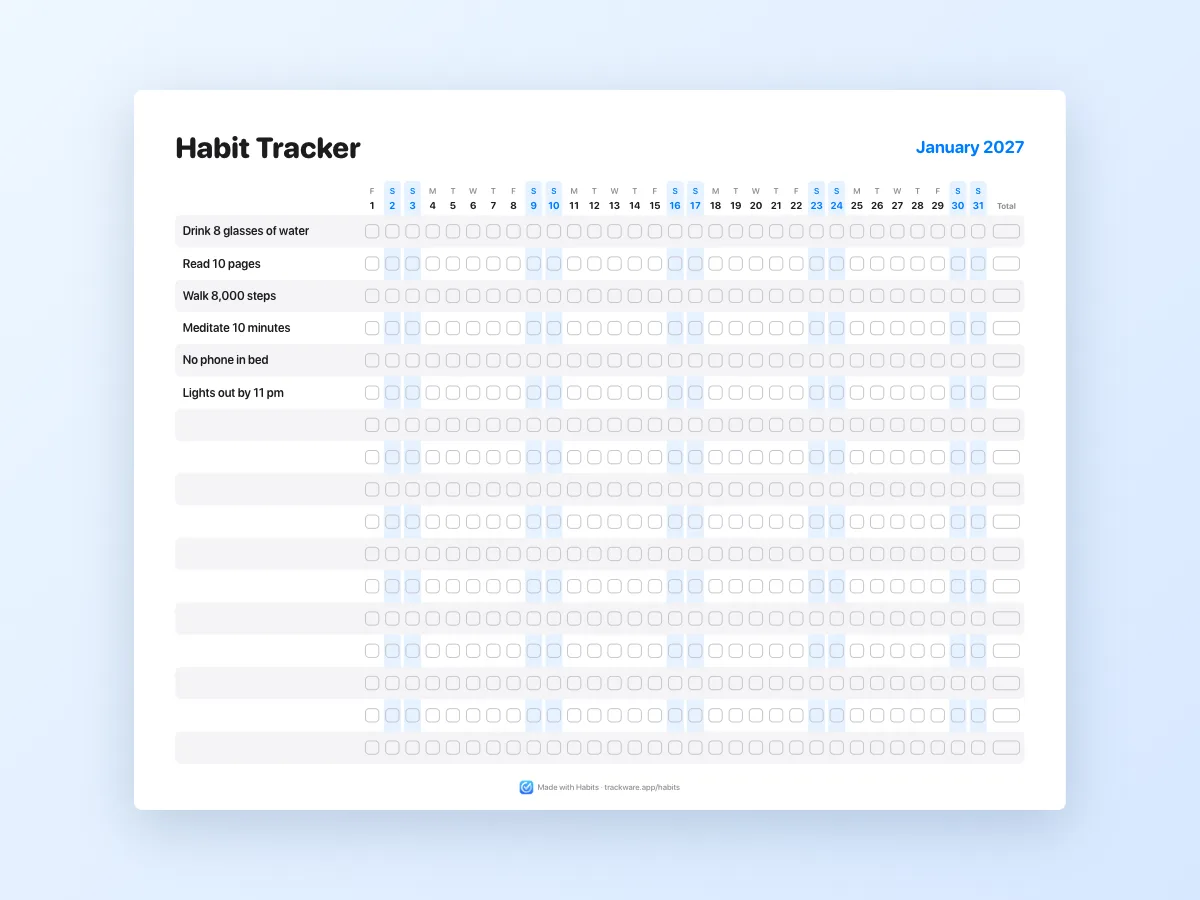
The monthly habit tracker is the classic: one row per habit and one column per day, with weekends highlighted and a Total column to count your wins at the end of the month. It fits up to 30 habits on a landscape page and gives you the best overview.
The weekly habit tracker is undated, so you can print a stack of copies and reuse them. It holds up to 15 habits with room to write, plus a notes area for your weekly review. It works well when you are building one or two new habits and want a fresh start every week.
The year in pixels tracker follows one habit for 365 days: one small square per day, one column per month. Color the square when you do the habit and the whole year shows up at a glance, gaps included.
The challenge layout numbers the days of a 21, 30, 40, 66, 75 or 100-day challenge, for up to 4 habits. Write your start date and fill one circle per day. It is a good match for a fixed goal, like a 30-day fitness challenge or the 66 days of the best-known study on habits.
Letter, A4 or A5?
Choose Letter (8.5 x 11 inches) in the United States and Canada, and A4 (210 x 297 mm) almost everywhere else. The PDF page has the exact size of the paper, so there is nothing to adjust in the print settings.
A5 (148 x 210 mm) is half an A4 sheet, the usual size of planners and bullet journal notebooks. Print it on A5 paper, or print an A4 page and cut it in half. If you prefer to fill in your tracker on an iPad, download the PNG or the PDF and import it into your favorite note-taking app to check off your habits with an Apple Pencil.
How long should you track a habit?
The popular idea that a habit takes 21 days comes from Maxwell Maltz's 1960 book Psycho-Cybernetics, where he wrote that people needed a minimum of about 21 days to adjust to a change. It was never a measured rule.
The best known study on the topic was led by Phillippa Lally at University College London and published in 2009. Volunteers repeated a new daily habit, like drinking water at lunch or running before dinner, until it felt automatic. The median was 66 days among the 39 people whose data followed the model well, but the estimates went from 18 to 254 days depending on the person and the habit.
So plan for about two months, and do not worry if your habit takes longer. This is also why the challenge layout offers 66 days, and why a monthly tracker is best printed again for a second and third month.
Tips to make your habit tracker stick
Start small. One to three new habits are easier to keep than fifteen, and you can add more once the first ones feel easy.
Make each habit specific and measurable. "Read 10 pages" is easier to check off than "Read more", and "Walk 8,000 steps" is clearer than "Move".
Put your tracker where you will see it every day: on the fridge, next to your desk or in your planner. Check off the box right after you do the habit, not at the end of the week.
Do not aim for a perfect sheet. In the Lally study, missing a single day did not change the outcome. A common rule is to never miss twice: one empty box is normal, two in a row is the moment to restart.
From paper to your iPhone
Paper is great to start, but it cannot remind you, count your streaks or travel with you. We make Habits, a habit tracker app for iPhone, iPad, Apple Watch and Mac, for the moment you want more than a sheet on the fridge.
Habits sends reminders, shows your streaks and statistics, lets you check off habits from widgets and your Apple Watch, and can complete habits automatically with Apple Health. The free version tracks up to 3 habits, with no account and no ads, and your data stays in your private iCloud.
Frequently asked questions
Related articles
New Year's Resolution Ideas for 2027: 60 You Can Actually Track
60 New Year's resolution ideas for 2027, each turned into a small daily or weekly habit you can track, with free printable trackers to start on January 1.
6 min read
Bullet Journal Habit Tracker: 12 Layout Ideas and Free Printables
12 habit tracker layouts for your bullet journal, from the classic monthly grid to Year in Pixels, with tips to draw them fast and free printables in A5.
3 min read
How Many Habits Should You Track at Once?
Start with one to three habits, then add more once they run on their own. Why fewer is better, how to choose them, and when to add a new one.
2 min read